WooCommerce API checkout performance lag: fix slow checkout delays
A technical guide for stores dealing with slow WooCommerce checkout, API performance lag, slow payment gateways, blocking email hooks, and delayed order confirmation.
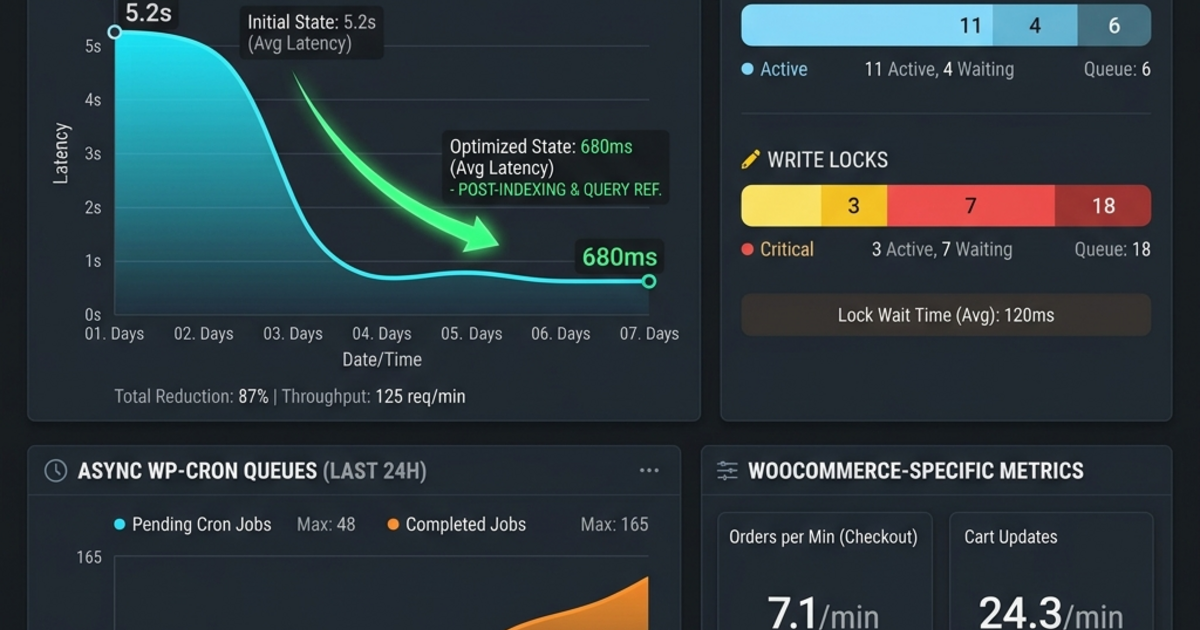
Slow checkout is one of the most expensive WooCommerce problems because it appears at the point where a buyer has already decided to pay. When the confirmation step hangs, users lose trust, refresh the page, or contact support before the order has finished processing.
WooCommerce API checkout performance lag usually comes from backend work sitting inside the critical checkout response path: payment gateway calls, synchronous email hooks, inventory sync, CRM updates, analytics webhooks, and heavy plugin callbacks.
What the 24-Hour SEO Blueprint Changes
Google Search Console already shows impressions for the query woocommerce checkout slow. Instead of treating that as a generic e-commerce topic, this page answers the exact operational problem: why checkout hangs, which hooks and API calls to inspect, and how to reduce confirmation time without breaking order reliability.
Where Checkout Lag Usually Starts
Blocking payment gateway APIs
Gateways should have clear timeouts and logged response times. A slow external API should not freeze every post-payment task or leave the customer staring at an uncertain confirmation screen.
Synchronous email hooks
Order emails matter, but they rarely need to block the HTTP response. Queueing emails after order creation can remove seconds from the critical path.
Post-order webhooks
CRM sync, inventory notifications, shipping systems, and analytics events should be reviewed carefully. Many stores run every integration inline even when the customer only needs a confirmed order response.
Code Pattern: Move Non-Critical Work Async
add_action("woocommerce_checkout_order_created", function (WC_Order $order) {
    if (!wp_next_scheduled("amirence_async_post_order", [$order->get_id()])) {
        wp_schedule_single_event(time() + 2, "amirence_async_post_order", [
            $order->get_id(),
        ]);
    }
});

add_action("amirence_async_post_order", function (int $order_id) {
    $order = wc_get_order($order_id);
    if (!$order) {
        return;
    }

    // Send emails, sync CRM, and dispatch non-critical webhooks here.
});
This pattern is not a full solution by itself. The exact hooks depend on the store, plugins, and gateway. The principle is stable: only critical work should block checkout confirmation.
How to Diagnose Before Changing Code
- Measure time from checkout submit to order-created event.
- Log payment gateway HTTP duration and timeout behavior.
- Profile WooCommerce hooks triggered during status transitions.
- Inspect database query volume for cart and product metadata.
- Review plugin callbacks that run emails, webhooks, or sync jobs inline.
Recommended Internal Links
Review the WooCommerce checkout performance case study, compare WordPress development services, or look at website speed optimization. UAE store owners can also review UAE web development services.
Call to Action
If checkout confirmation takes several seconds, send the store URL, gateway, plugin list, hosting environment, and a short recording of the slow step. I can identify whether the bottleneck is gateway latency, hooks, plugins, database queries, or server response time.
FAQ
- What causes WooCommerce API checkout performance lag?
- Common causes include slow payment gateway APIs, synchronous email hooks, inventory sync, third-party webhooks, heavy plugins, uncached product metadata, and server response delays during order creation.
- Can checkout lag increase cart abandonment?
- Yes. When order confirmation takes several seconds, customers can lose trust, refresh the page, abandon payment, or create duplicate support issues.
- Should emails and webhooks run during checkout?
- Only critical payment and order creation work should block checkout. Emails, CRM sync, inventory notifications, and analytics webhooks are often better queued after the response.
- How do you diagnose a slow WooCommerce checkout?
- Profile checkout hooks, payment gateway HTTP calls, database queries, email triggers, plugin overhead, server logs, and the exact time between order creation and response completion.